> ## Documentation Index
> Fetch the complete documentation index at: https://releasenotes.siya.com/llms.txt
> Use this file to discover all available pages before exploring further.
# SIYA — Release Notes
*Version : V0.4.105*
## Overview
This release deepens operational visibility across Technical Forms, Voyage Monitoring, PMS, and Purchase. Technical Forms now surfaces a live Submission Report KPI alongside month-wise vessel Short Summaries. Voyage Monitoring adds JWC war-risk area overlays on the ETA map, a consolidated Running Hours card, a unified Lube Oil card, and a default 2D routes map. The RightShip dashboard gains a Company Safety Score KPI, and Micro Apps now offer a direct 'Back to SIYA Chat' link. The PMS Dashboard adds overdue-percentage tracking, Work Order Number visibility, deferred-job due-date comparisons, new filter tabs, and a Card/Table toggle with an Individual Vessel slide-out in the multi-Vessel View. The Purchase Dashboard is significantly expanded with a PR Log/KPI toggle, closed PR/PO visibility, a fleet-wide Notifications bell, a new Agent Inbox tracking fourteen procurement events end-to-end, a redesigned PR Detail Panel with AI-driven vendor recommendations and budget tracking, a Progress timeline view, and a full Quote Comparison workspace with Excel export.
***
## New Features / Improvements
1. **Technical Forms**
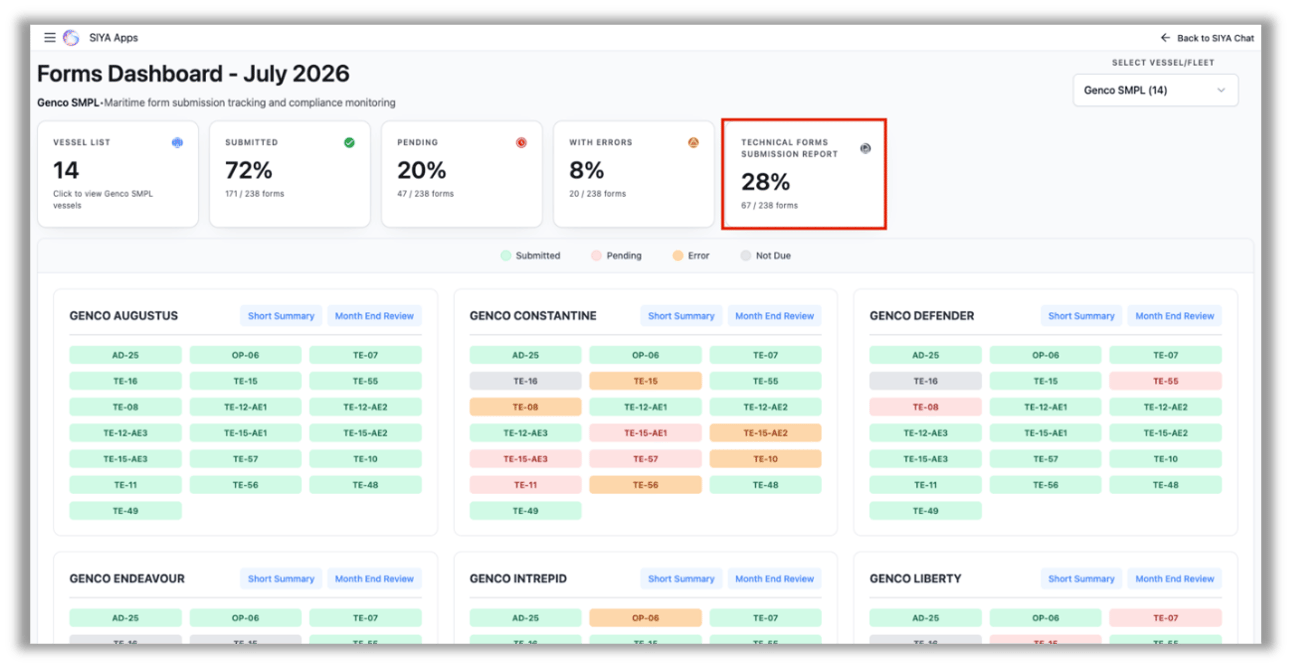
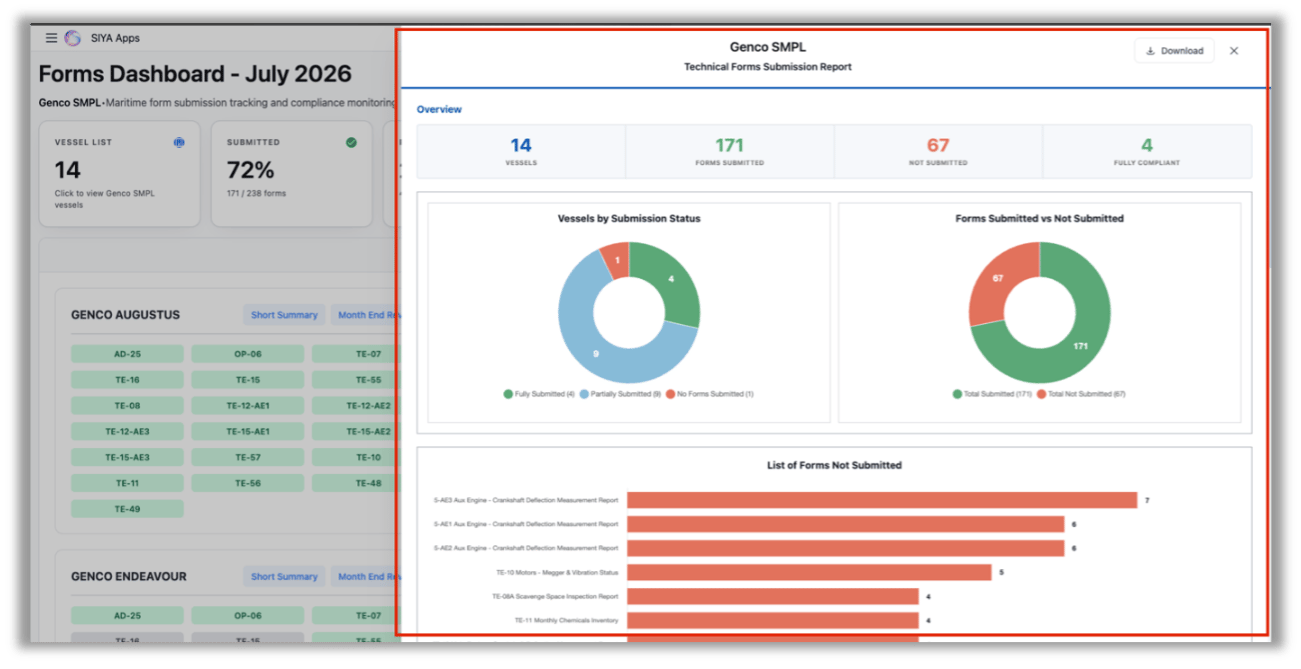
2. \*\*Technical Forms Submission Report KPI \*\* - Added a new “Technical Forms Submission Report” KPI that provides a live view of the month’s submission status with charts and statistics.
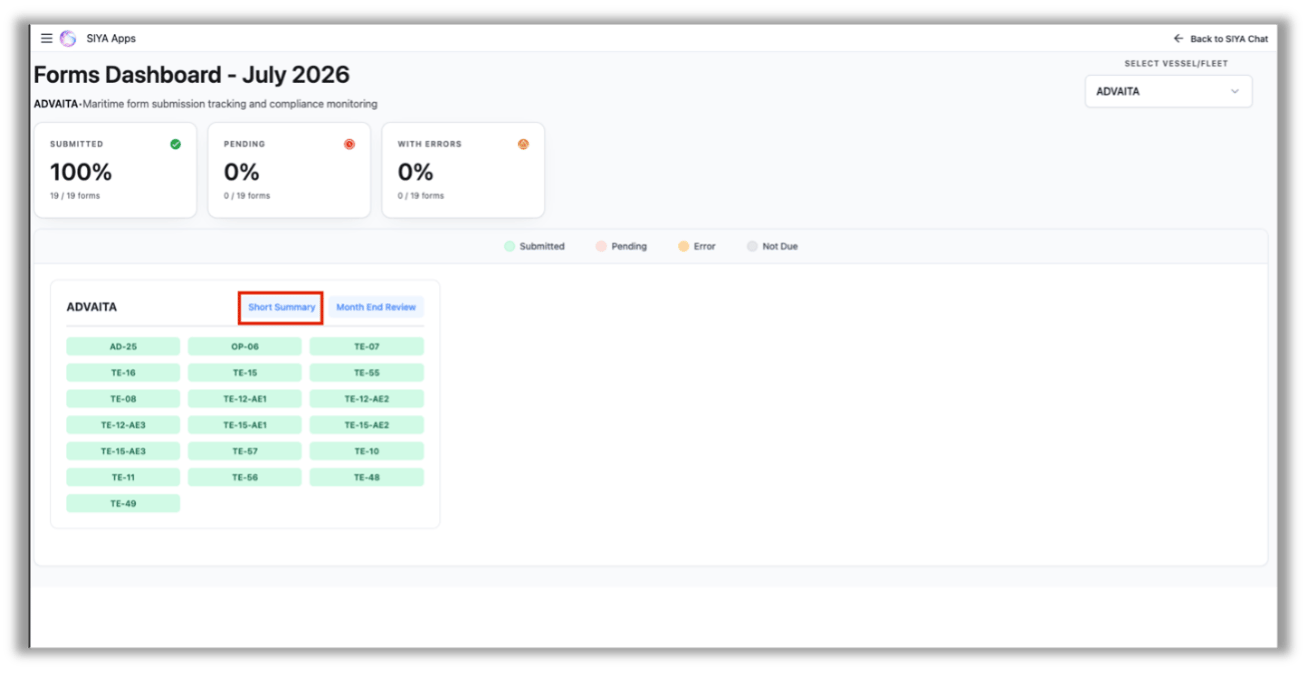
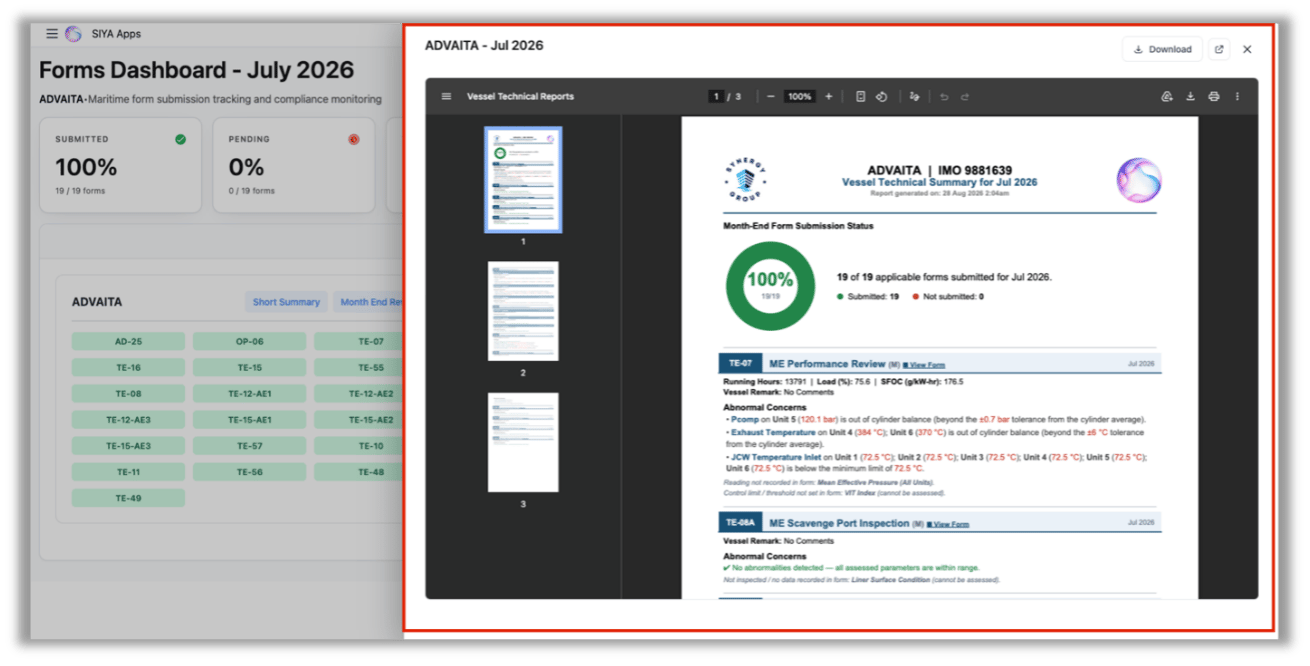
 2. \*\*Vessel Short Summary Action \*\* — Added a Short Summary action to vessel cards, loading Vessel Technical Summary PDFs with month-wise availability.
 2. **Voyage Monitoring App Enhancements**
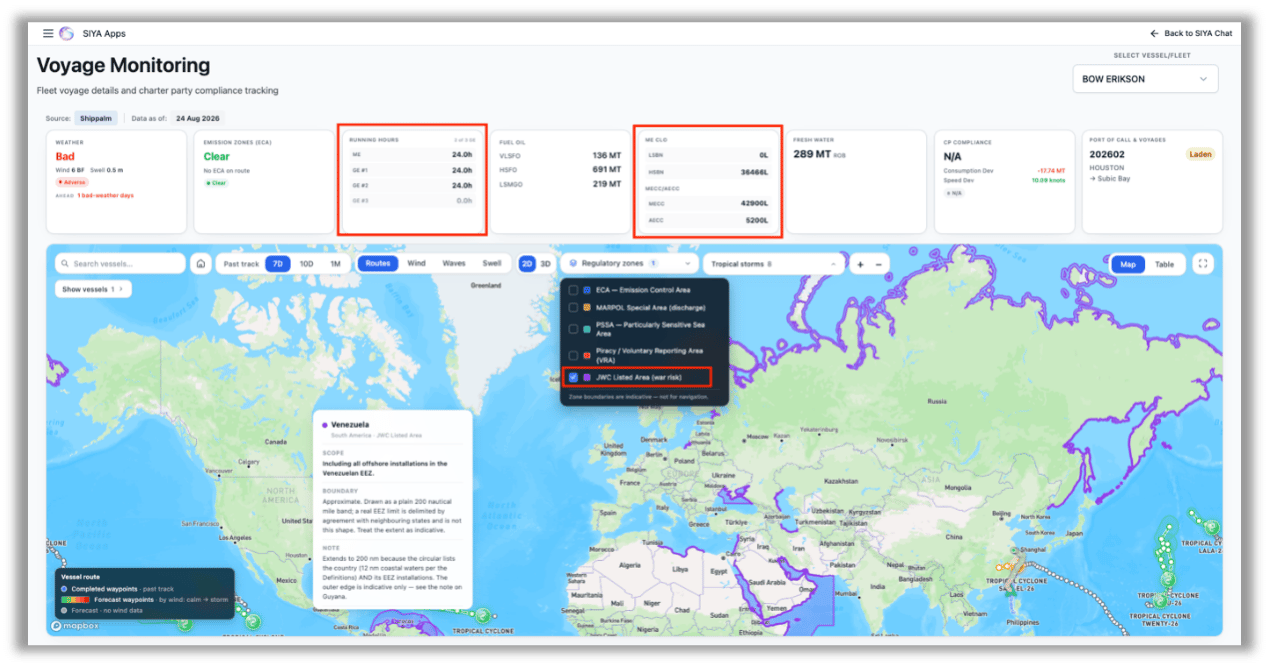
3. **War-Risk Areas on the Map** — The ETA map now shows JWC Listed Areas: the waters where underwriters must be notified before a voyage. Click any area to see which circular defined it, when the boundary last moved, and any scope conditions. Built from the current circular, JWLA-034 (29 July 2026).
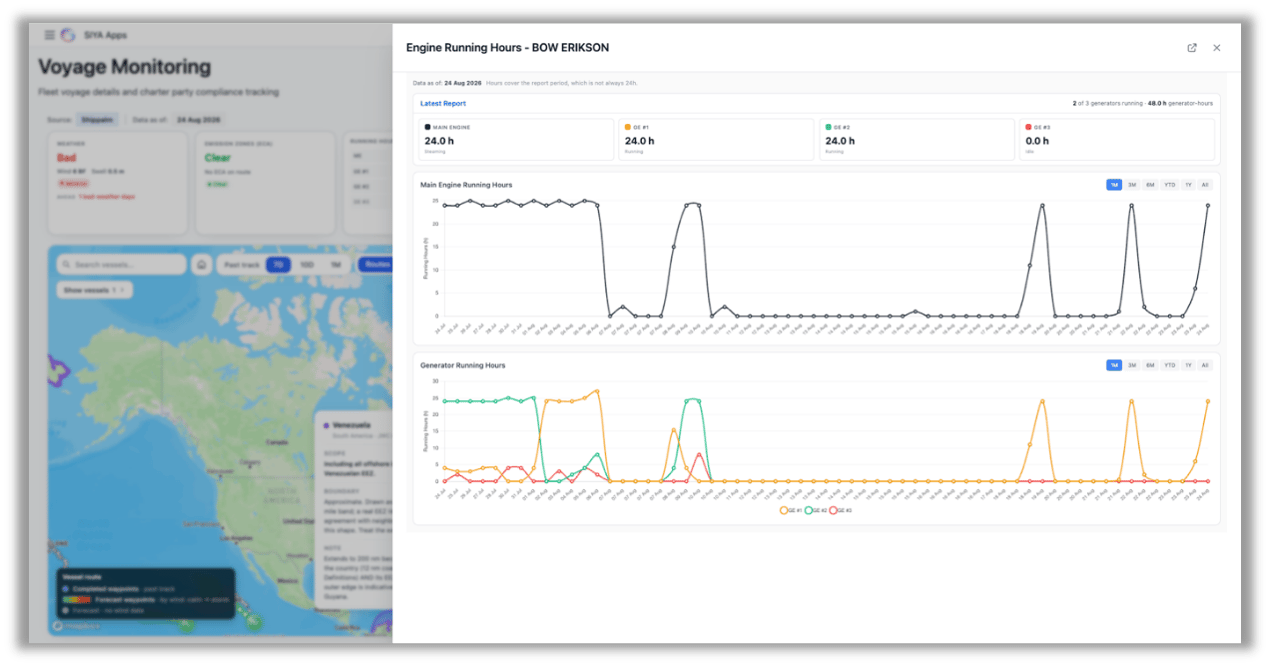
4. **Running Hours Card** — Main engine and generator running hours from the noon report, on the metrics strip next to ECA. Each generator is shown separately. Idle generators stay visible in grey, so rotation is easy to see.
5. Lube Oil Card — ME CLO and MECC/AECC are now one card with a section each, opening a single panel with a tab per section. Replaces the two separate cards.
6. 2D Routes Map — The routes map now opens as a flat 2D map by default and scrolls continuously east–west.
2. **Voyage Monitoring App Enhancements**
3. **War-Risk Areas on the Map** — The ETA map now shows JWC Listed Areas: the waters where underwriters must be notified before a voyage. Click any area to see which circular defined it, when the boundary last moved, and any scope conditions. Built from the current circular, JWLA-034 (29 July 2026).
4. **Running Hours Card** — Main engine and generator running hours from the noon report, on the metrics strip next to ECA. Each generator is shown separately. Idle generators stay visible in grey, so rotation is easy to see.
5. Lube Oil Card — ME CLO and MECC/AECC are now one card with a section each, opening a single panel with a tab per section. Replaces the two separate cards.
6. 2D Routes Map — The routes map now opens as a flat 2D map by default and scrolls continuously east–west.
 3. **RightShip Dashboard**
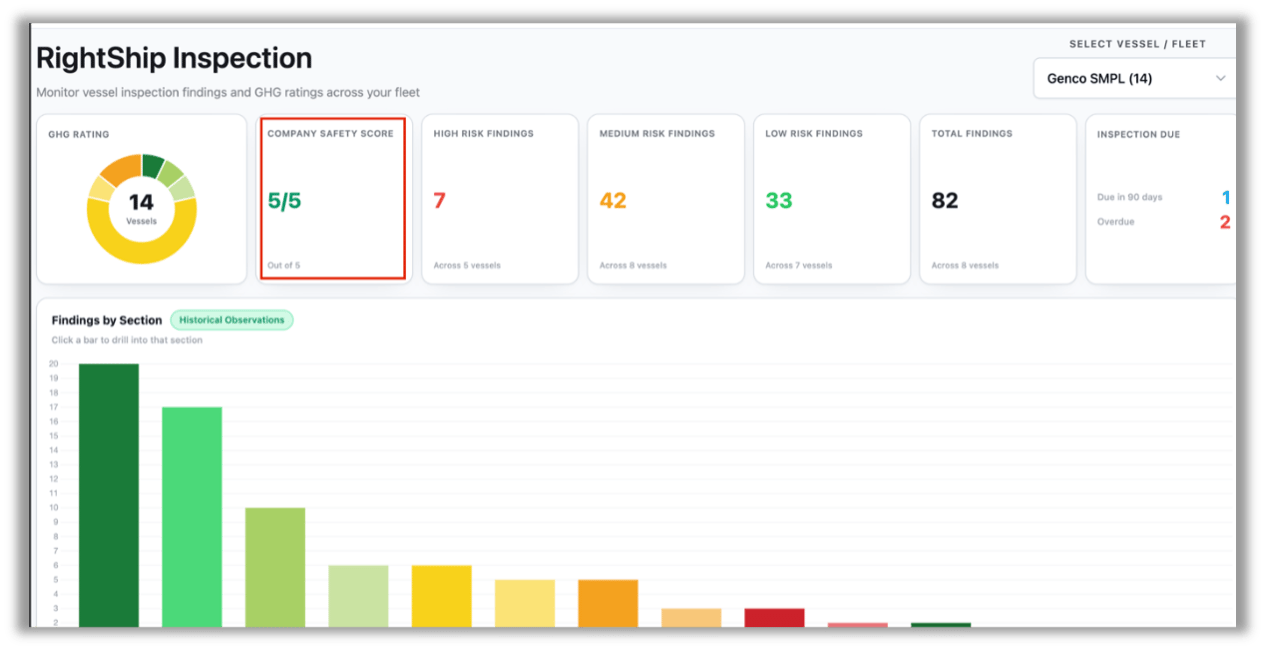
4. **Company Safety Score KPI** - Added a Company Safety Score KPI card to the RightShip dashboard for DOC-wise fleet view, displaying the company’s safety score out of 5.
3. **RightShip Dashboard**
4. **Company Safety Score KPI** - Added a Company Safety Score KPI card to the RightShip dashboard for DOC-wise fleet view, displaying the company’s safety score out of 5.
 4. **Chat Access from Micro Apps**
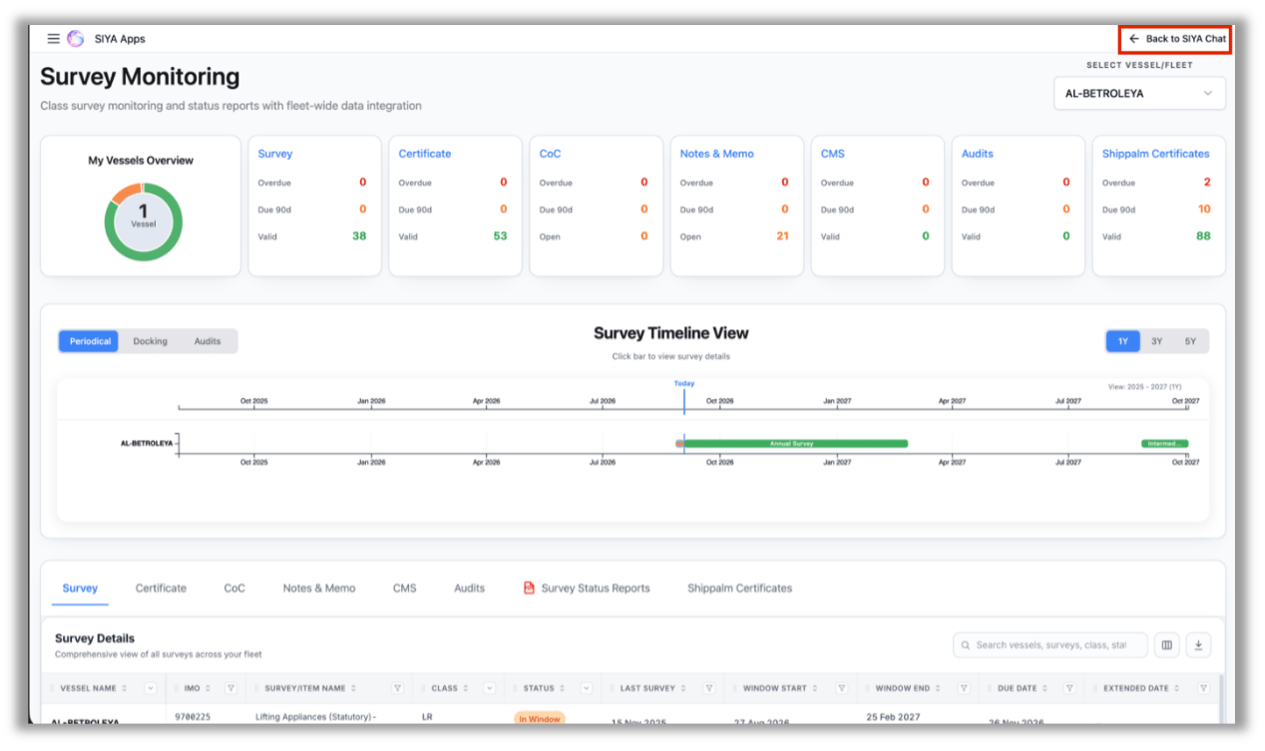
5. **Back to SIYA Chat** - Added a ‘Back to SIYA Chat’ click option in the top-right corner of Micro Apps, removing the need to navigate back through the chat window.
4. **Chat Access from Micro Apps**
5. **Back to SIYA Chat** - Added a ‘Back to SIYA Chat’ click option in the top-right corner of Micro Apps, removing the need to navigate back through the chat window.
 5. **PMS Dashboard Enhancements**
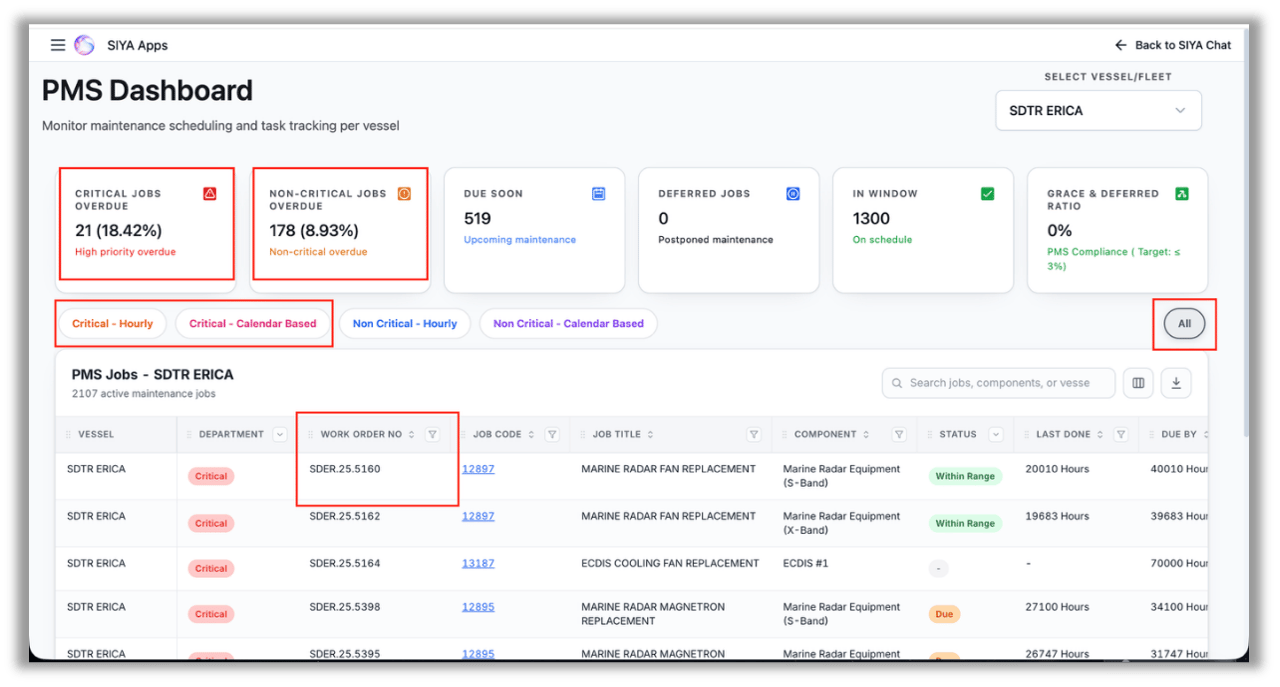
6. **Overdue Percentage per Category** — Added the overdue percentage for each category, calculated as the number of overdue jobs in the category divided by the total number of jobs in the category.
7. **Work Order Number Column** — Added the ‘Work Order Number’ to the main table for easier identification. This field is available for V3 vessels; for V2 vessels, it displays “N/A.”
8. **New Filter Tabs** — Added All, Critical Hourly, and Critical Calendar-Based filter tabs for easier navigation and filtering.
5. **PMS Dashboard Enhancements**
6. **Overdue Percentage per Category** — Added the overdue percentage for each category, calculated as the number of overdue jobs in the category divided by the total number of jobs in the category.
7. **Work Order Number Column** — Added the ‘Work Order Number’ to the main table for easier identification. This field is available for V3 vessels; for V2 vessels, it displays “N/A.”
8. **New Filter Tabs** — Added All, Critical Hourly, and Critical Calendar-Based filter tabs for easier navigation and filtering.
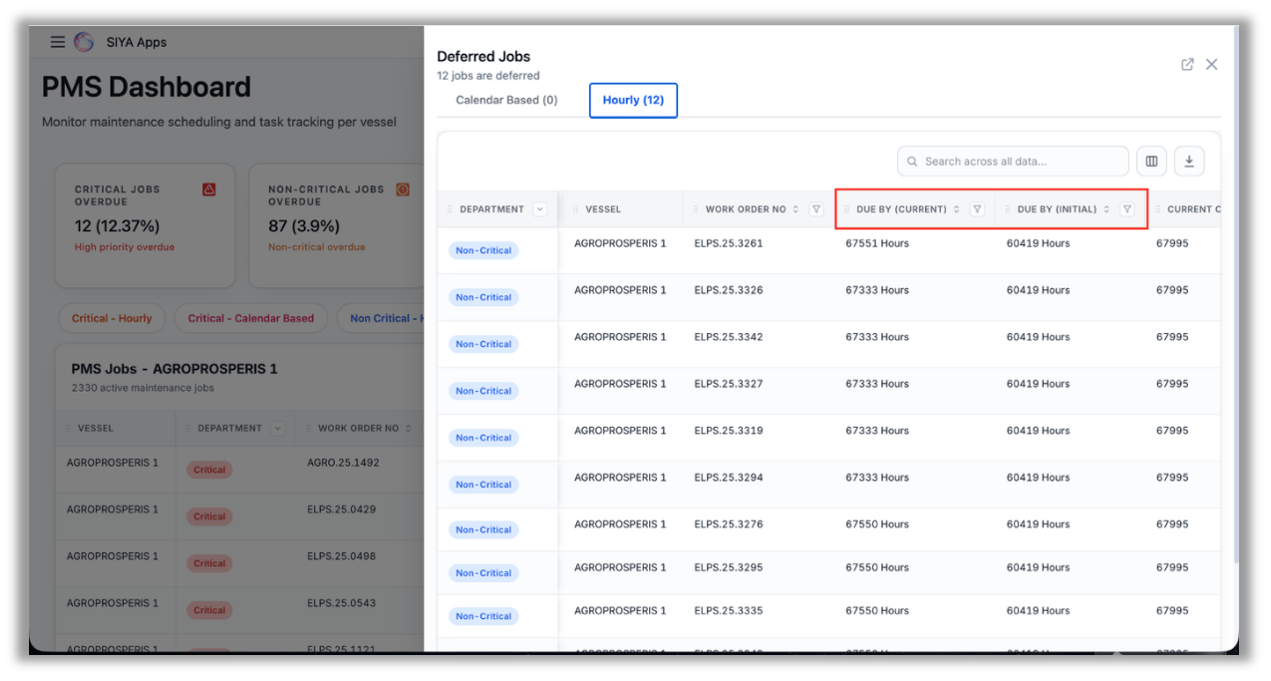
 4. **Deferred Jobs Due-Date Comparison** — Added Due By (Initial) and Due By (Current) fields to the Deferred Jobs card, making it easier to compare due dates before and after deferment.
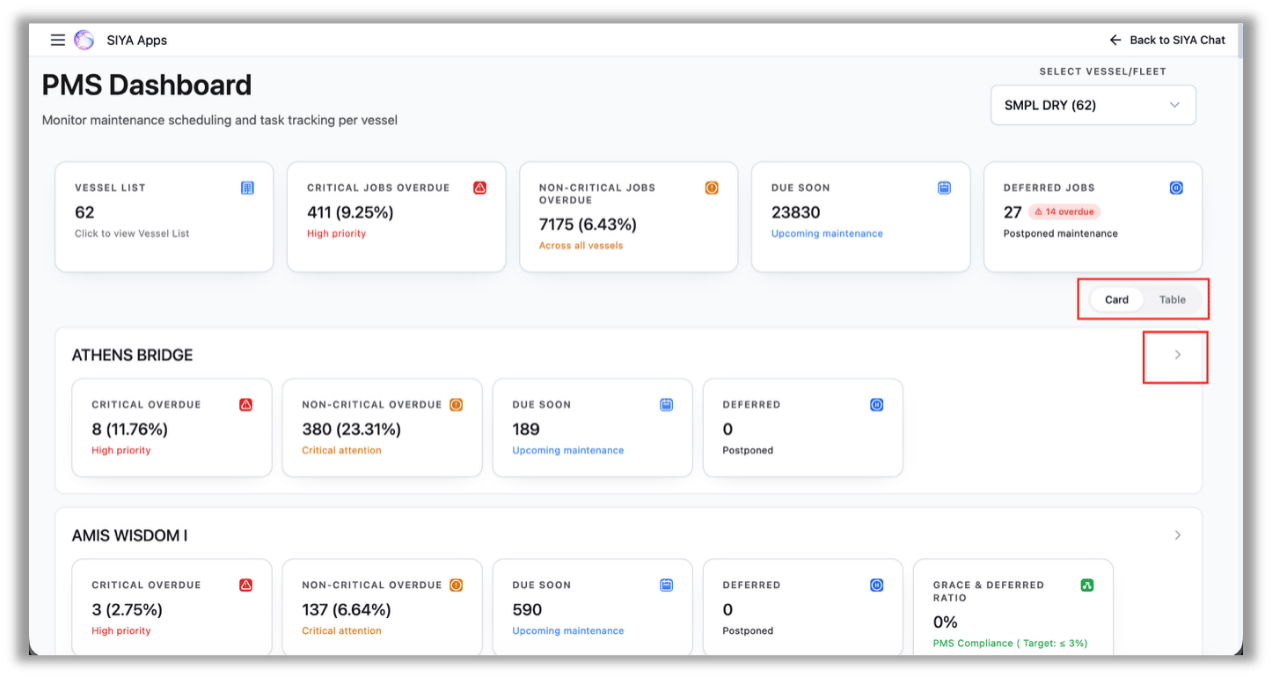
 5. **Card/Table Toggle in Multi-Vessel View** — Card/Table view toggle is brought into the Multi-Vessel View. The Table view also allows users to download the count data displayed in the cards.
6. **Individual Vessel Slide-Out** — Added a slide-out Individual Vessel View, providing all information for the selected vessel without leaving the multi-Vessel View.
5. **Card/Table Toggle in Multi-Vessel View** — Card/Table view toggle is brought into the Multi-Vessel View. The Table view also allows users to download the count data displayed in the cards.
6. **Individual Vessel Slide-Out** — Added a slide-out Individual Vessel View, providing all information for the selected vessel without leaving the multi-Vessel View.
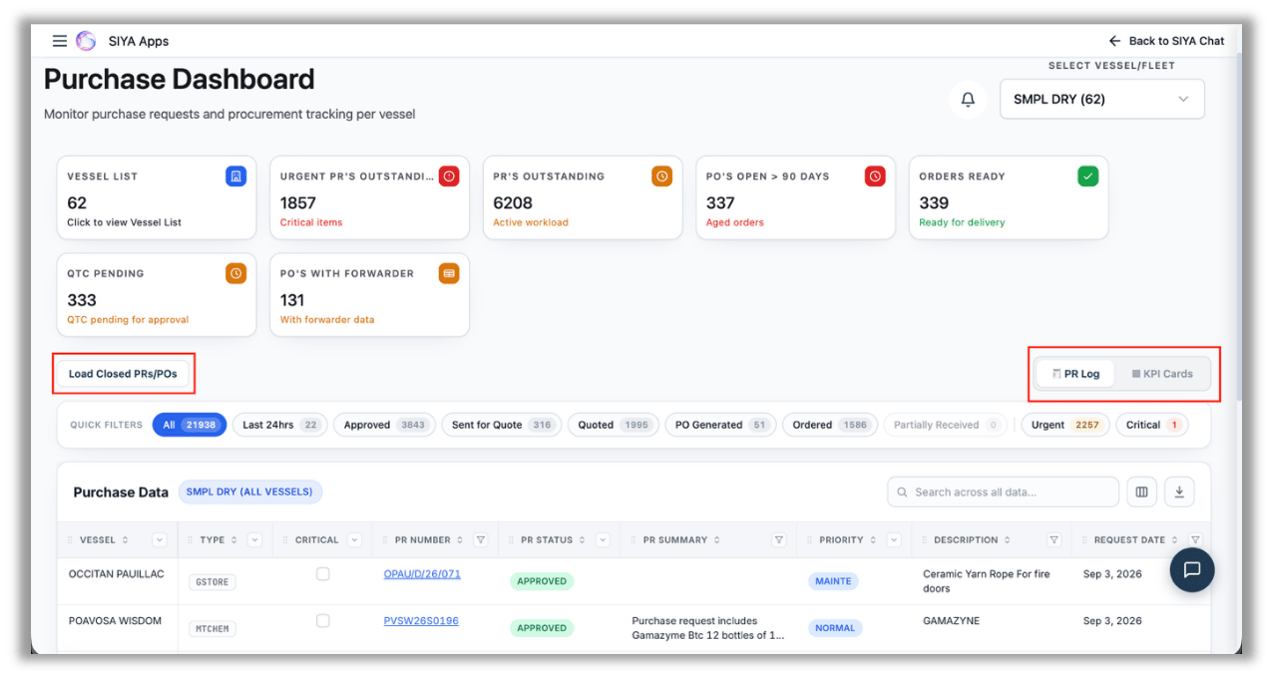
 6. **Purchase Dashboard Enhancements** -
7. **PR Log/KPI Toggle** — Added a ‘PR Log/KPI’ Card toggle to the Fleet View, allowing users to access the PR Log for the entire selected fleet.
8. **Load Closed PRs/POs** — Added an option to display all closed Purchase Requisitions (PRs) and Purchase Orders (POs) for the selected group/fleet; the relevant data loads and displays when clicked.
6. **Purchase Dashboard Enhancements** -
7. **PR Log/KPI Toggle** — Added a ‘PR Log/KPI’ Card toggle to the Fleet View, allowing users to access the PR Log for the entire selected fleet.
8. **Load Closed PRs/POs** — Added an option to display all closed Purchase Requisitions (PRs) and Purchase Orders (POs) for the selected group/fleet; the relevant data loads and displays when clicked.
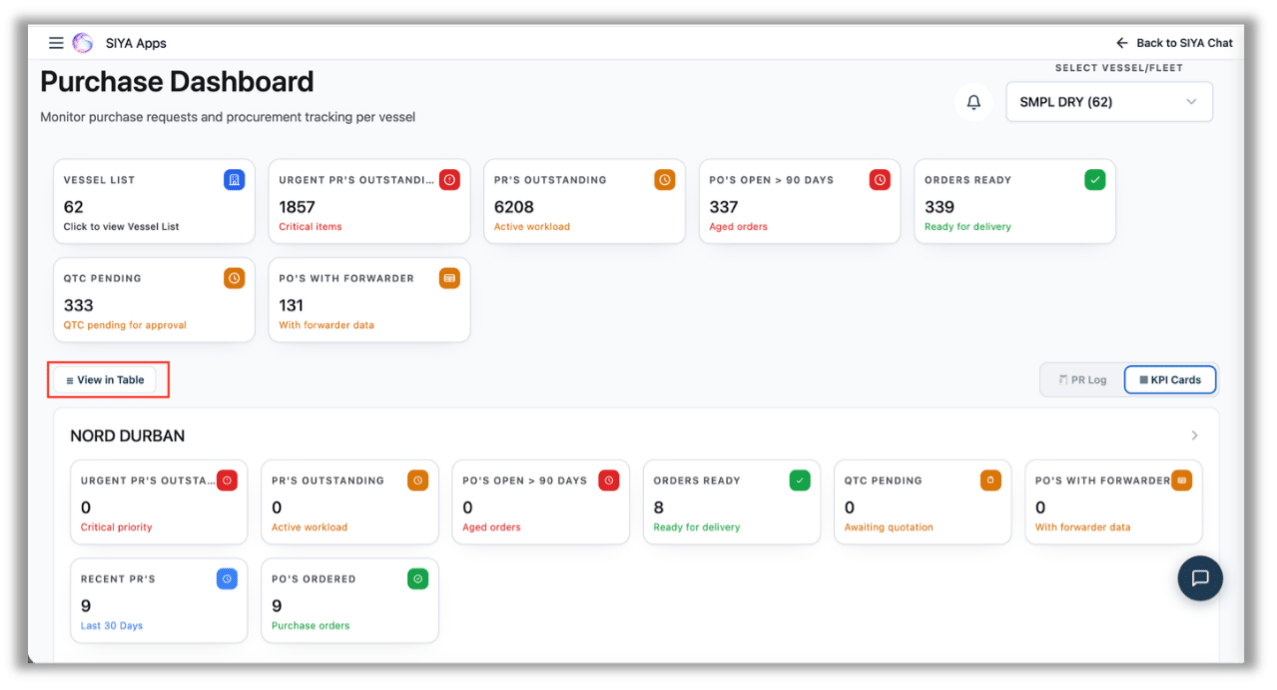
 3. View in Table — Added a ‘View in Table’ option within the KPI Card view, allowing users to review and download the count data displayed in the cards.
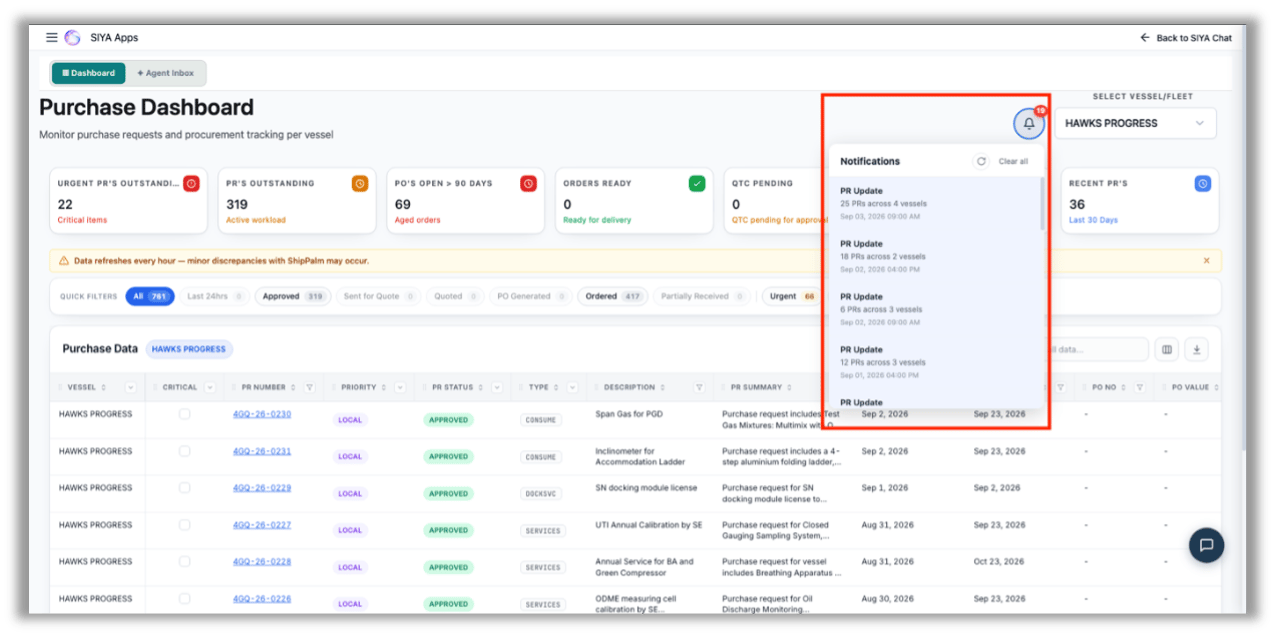
 4. Notifications (Bell Icon) — The bell icon in the Purchase Dashboard header tracks overall PR movement across the user’s whole fleet, independent of the vessel currently selected. It compares each day’s PR data against the previous state and records what moved — newly raised PRs and PRs whose status has changed — over a rolling 24-hour window.
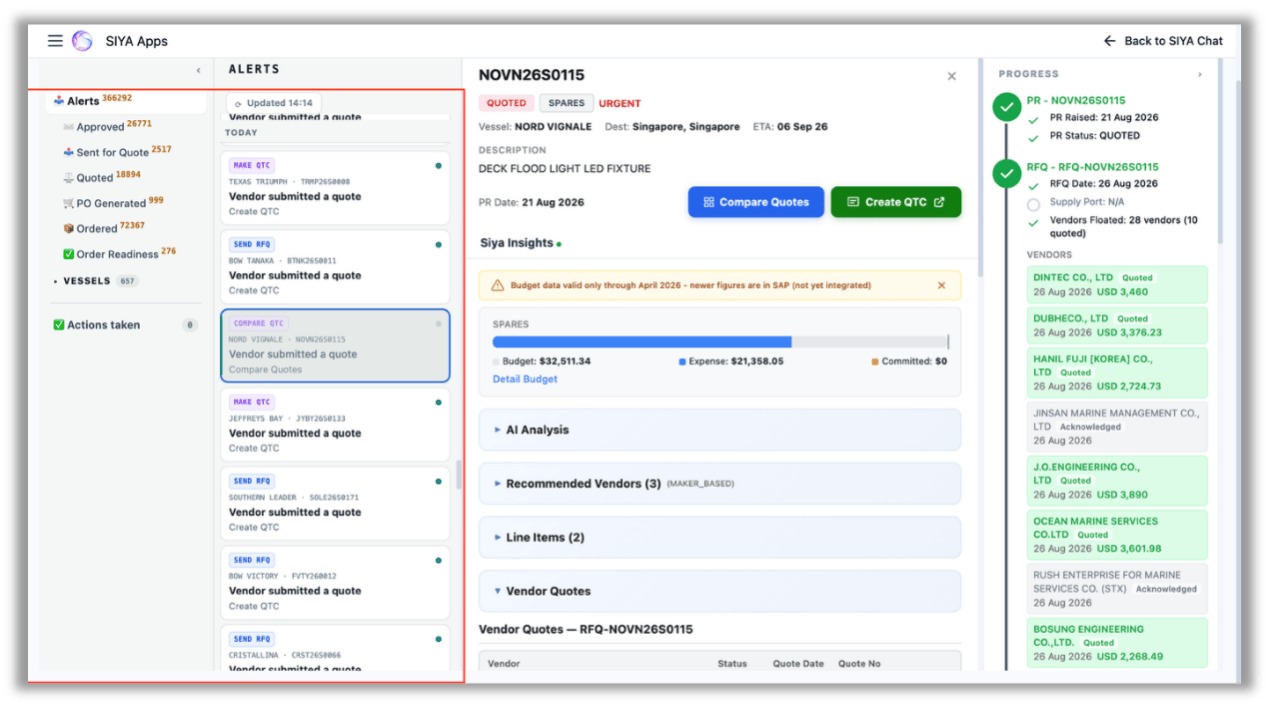
 5. **Agent Inbox** — An event-driven view of procurement activity. Every change in the state of a Purchase Requisition (PR) — a vendor submitting a quote, a PO being cancelled, order readiness being updated — is raised as an alert in a single feed, along with the action expected next.
6. **Alerts feed** — PR events listed newest first and grouped by date, each identifying the vessel and PR reference, what changed, and a link to the next step.
7. **Stage filters** — Alerts split by lifecycle stage with live counts: Approved, Sent for Quote, Quoted, PO Generated, Ordered, and Order Readiness (current day only).
8. **Vessel filter** — Restricts the feed to a single vessel’s PR events and combines with the stage filters.
9. **What is tracked** — Fourteen procurement events are tracked across the PR lifecycle, each carrying the next action it implies:
a. **Requisition** — PR raised (next: send for quote), PR closed, PR cancelled.
b. **Quotation** — RFQ floated to vendors, and vendor submitted a quote. (create QTC, or compare quotes where a QTC already exists).
c. **QTC** — QTC created (send for approval), QTC sent for approval (approve), QTC approved (place the PO).
d. **Purchase order** — PO created from the QTC (approve PO), PO issued (track the order), PO closed/delivered, PO cancelled (review the cancellation).
e. **Invoicing** — Purchase invoice generated. Each PR appears once in the feed, represented by its most recent qualifying event, so a PR with many events does not flood the list.
5. **Agent Inbox** — An event-driven view of procurement activity. Every change in the state of a Purchase Requisition (PR) — a vendor submitting a quote, a PO being cancelled, order readiness being updated — is raised as an alert in a single feed, along with the action expected next.
6. **Alerts feed** — PR events listed newest first and grouped by date, each identifying the vessel and PR reference, what changed, and a link to the next step.
7. **Stage filters** — Alerts split by lifecycle stage with live counts: Approved, Sent for Quote, Quoted, PO Generated, Ordered, and Order Readiness (current day only).
8. **Vessel filter** — Restricts the feed to a single vessel’s PR events and combines with the stage filters.
9. **What is tracked** — Fourteen procurement events are tracked across the PR lifecycle, each carrying the next action it implies:
a. **Requisition** — PR raised (next: send for quote), PR closed, PR cancelled.
b. **Quotation** — RFQ floated to vendors, and vendor submitted a quote. (create QTC, or compare quotes where a QTC already exists).
c. **QTC** — QTC created (send for approval), QTC sent for approval (approve), QTC approved (place the PO).
d. **Purchase order** — PO created from the QTC (approve PO), PO issued (track the order), PO closed/delivered, PO cancelled (review the cancellation).
e. **Invoicing** — Purchase invoice generated. Each PR appears once in the feed, represented by its most recent qualifying event, so a PR with many events does not flood the list.
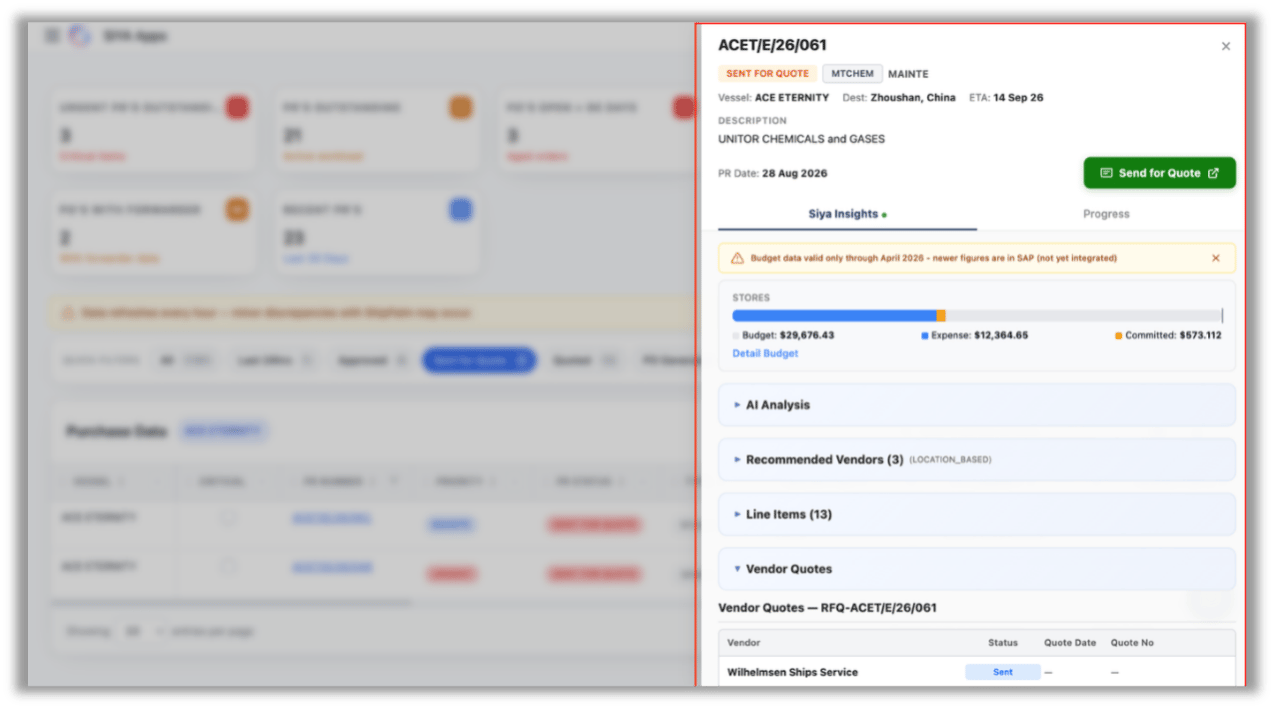
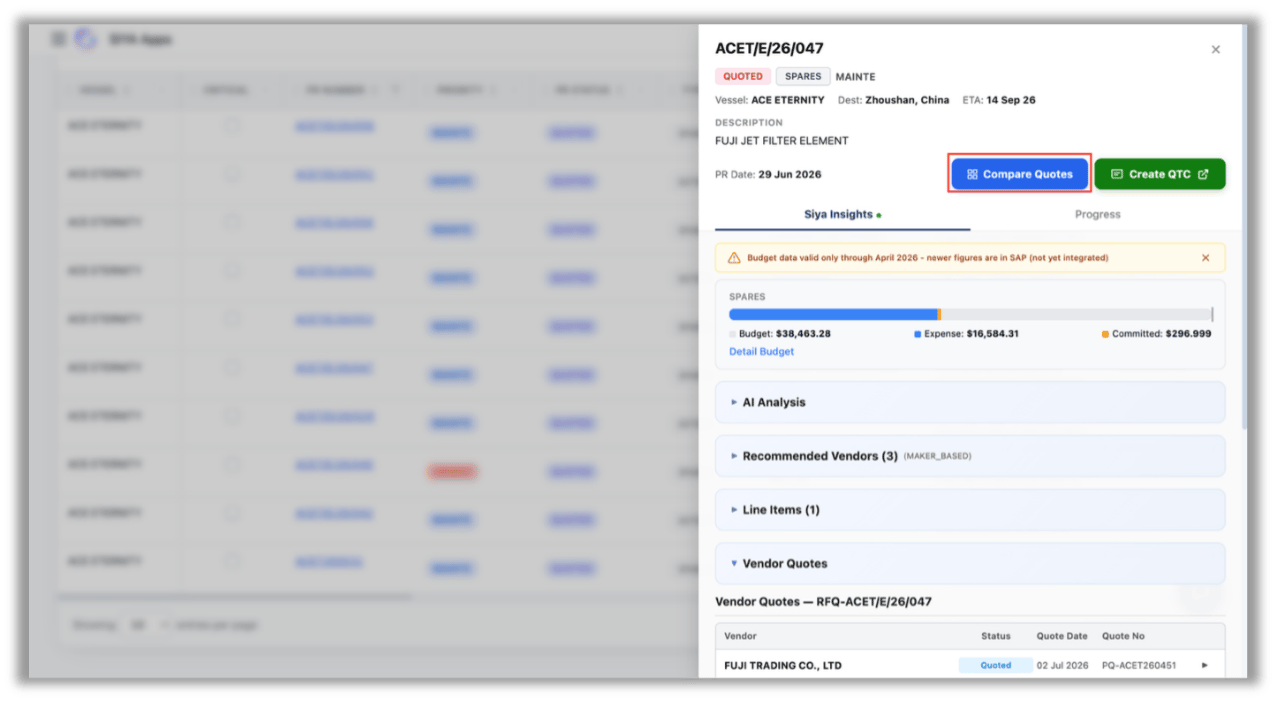
 6. **PR Detail Panel** — Opens as a side/modal panel when any PR row is clicked. Header shows the PR number, status and type tags (e.g. QUOTED / SPARES / DEFECT), vessel with Destination and ETA, item description, PR date, and a set of action buttons that changes with the PR’s stage. Below sits the Siya Insights block — a warning banner on budget data currency, the budget strip, and the collapsible sections.
7. **Action buttons** — Driven by PR status: an Approved PR shows only Send for Quote; once Sent for Quote it shows Compare Quotes alongside Send for Quote; at Quoted stage it shows Compare Quotes with either Create QTC (no QTC yet) or View QTC (QTC already exists); and at PO Generated / Ordered stage it shows Compare Quotes with View PO.
8. **Budget strip** — Labelled by spend category (STORES / SPARES), with a bar showing Budget, Expense and Committed plus a Detail Budget link. When expense crosses the budget, the bar turns red and a Budget Exceeded flag appears. A banner above notes that budget figures are valid only up to the last integrated period, with newer figures still in SAP.
9. **AI Analysis** — Procurement insights generated by comparing the current PR against similar past events on the same vessel: repeat or duplicate requisitions, overlaps with recently cancelled requests, frequency patterns over a rolling period, urgency patterns, and prior vendors used for similar items.
10. **Recommended Vendors (n)** — Vendors suggested from historical purchase data, with the match basis tagged (MAKER\_BASED, LOCATION\_BASED).
11. **Line Items (n)** — The individual items requested on the PR with quantities and specifications.
12. **Vendor Quotes** — Titled by RFQ number (`RFQ-[PR no]`); lists vendors contacted with Status, Quote Date and Quote No. Dashes mean the vendor has acknowledged but not yet quoted. Appears once the PR is sent for quote.
13. **Purchase Orders (n)** — Appears only at PO Generated / Ordered stage, showing the PO raised against the selected vendor.
6. **PR Detail Panel** — Opens as a side/modal panel when any PR row is clicked. Header shows the PR number, status and type tags (e.g. QUOTED / SPARES / DEFECT), vessel with Destination and ETA, item description, PR date, and a set of action buttons that changes with the PR’s stage. Below sits the Siya Insights block — a warning banner on budget data currency, the budget strip, and the collapsible sections.
7. **Action buttons** — Driven by PR status: an Approved PR shows only Send for Quote; once Sent for Quote it shows Compare Quotes alongside Send for Quote; at Quoted stage it shows Compare Quotes with either Create QTC (no QTC yet) or View QTC (QTC already exists); and at PO Generated / Ordered stage it shows Compare Quotes with View PO.
8. **Budget strip** — Labelled by spend category (STORES / SPARES), with a bar showing Budget, Expense and Committed plus a Detail Budget link. When expense crosses the budget, the bar turns red and a Budget Exceeded flag appears. A banner above notes that budget figures are valid only up to the last integrated period, with newer figures still in SAP.
9. **AI Analysis** — Procurement insights generated by comparing the current PR against similar past events on the same vessel: repeat or duplicate requisitions, overlaps with recently cancelled requests, frequency patterns over a rolling period, urgency patterns, and prior vendors used for similar items.
10. **Recommended Vendors (n)** — Vendors suggested from historical purchase data, with the match basis tagged (MAKER\_BASED, LOCATION\_BASED).
11. **Line Items (n)** — The individual items requested on the PR with quantities and specifications.
12. **Vendor Quotes** — Titled by RFQ number (`RFQ-[PR no]`); lists vendors contacted with Status, Quote Date and Quote No. Dashes mean the vendor has acknowledged but not yet quoted. Appears once the PR is sent for quote.
13. **Purchase Orders (n)** — Appears only at PO Generated / Ordered stage, showing the PO raised against the selected vendor.
 7. **Progress Tab** — A second tab in the PR detail panel that lays out the PR’s full procurement journey as a vertical timeline (PR → RFQ → QTC → PO), with each completed stage tick-marked and expanded to show its key details, including the vendors floated and their quote status, date and value.
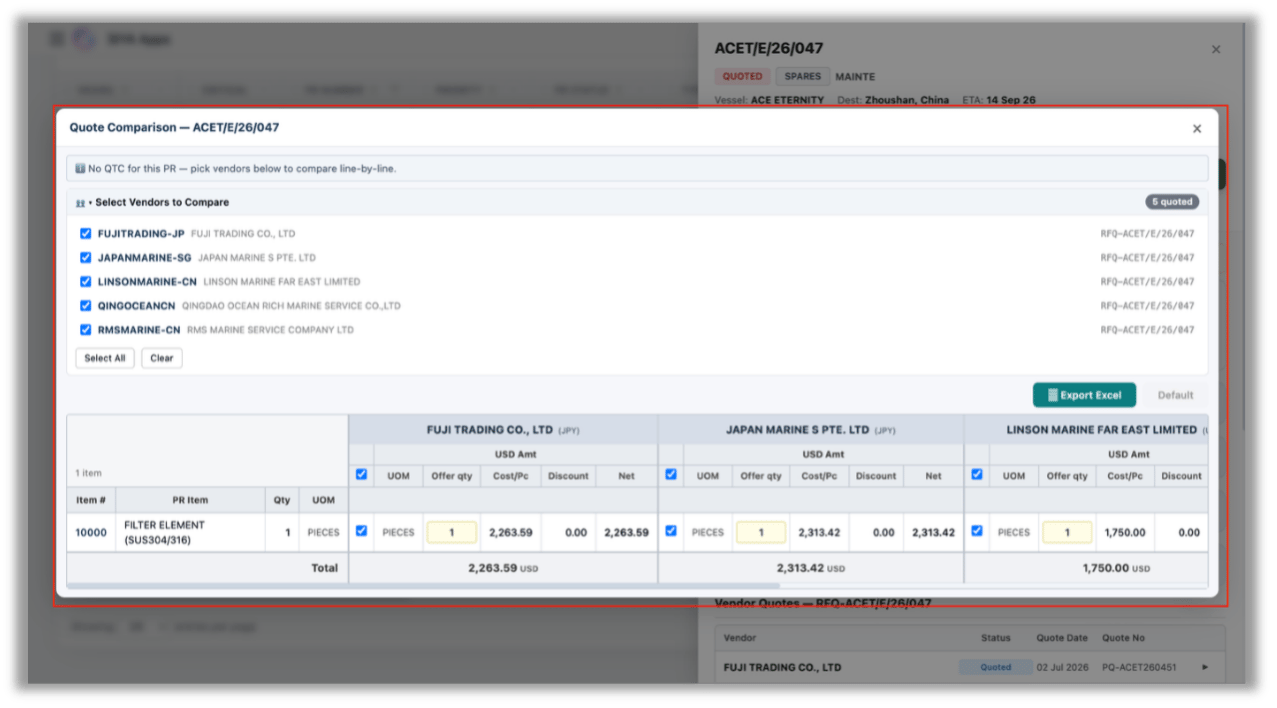
8. **Quote Comparison** — Opens on clicking Compare Quotes in the PR detail panel. Header shows the PR number (e.g. Quote Comparison — AGRO26S0167) with a close icon. If no QTC exists for the PR, an info banner prompts the user to pick vendors and compare line-by-line instead.
9. **Select Vendors to Compare** — Collapsible list of all vendors who responded to the RFQ, each showing vendor code, full legal name and the RFQ reference; a badge on the right shows the count of quotes received (e.g. “3 quoted”). Checkboxes control which vendors appear in the grid, with Select All and Clear shortcuts.
10. **Comparison grid** — PR line items form the fixed left columns (Item #, PR Item description, Qty, UOM); each selected vendor is appended as a horizontally scrollable column group.
11. **Per-vendor columns** — UOM, Offer qty (editable field), Cost/Pc, Discount and Net, all under a currency header (USD Amt). Column-level and row-level checkboxes let the user include or exclude a vendor’s line from the comparison.
12. **Totals row** — Footer sums each vendor’s net value in the quote currency, giving a direct price comparison across vendors for the same scope.
13. **Export Excel** — Downloads the comparison as a spreadsheet; the adjacent Default control resets the view/layout to its original state.
7. **Progress Tab** — A second tab in the PR detail panel that lays out the PR’s full procurement journey as a vertical timeline (PR → RFQ → QTC → PO), with each completed stage tick-marked and expanded to show its key details, including the vendors floated and their quote status, date and value.
8. **Quote Comparison** — Opens on clicking Compare Quotes in the PR detail panel. Header shows the PR number (e.g. Quote Comparison — AGRO26S0167) with a close icon. If no QTC exists for the PR, an info banner prompts the user to pick vendors and compare line-by-line instead.
9. **Select Vendors to Compare** — Collapsible list of all vendors who responded to the RFQ, each showing vendor code, full legal name and the RFQ reference; a badge on the right shows the count of quotes received (e.g. “3 quoted”). Checkboxes control which vendors appear in the grid, with Select All and Clear shortcuts.
10. **Comparison grid** — PR line items form the fixed left columns (Item #, PR Item description, Qty, UOM); each selected vendor is appended as a horizontally scrollable column group.
11. **Per-vendor columns** — UOM, Offer qty (editable field), Cost/Pc, Discount and Net, all under a currency header (USD Amt). Column-level and row-level checkboxes let the user include or exclude a vendor’s line from the comparison.
12. **Totals row** — Footer sums each vendor’s net value in the quote currency, giving a direct price comparison across vendors for the same scope.
13. **Export Excel** — Downloads the comparison as a spreadsheet; the adjacent Default control resets the view/layout to its original state.
 ***
***